

TL;DR
- WPA2-PSK gives everyone the same Wi-Fi password. If that password is exposed, anyone with it can access the network until the password is changed.
- Replace shared Wi-Fi password authentication type (WPA2-PSK) with better Wi‑Fi security protocol such as WPA2/3-Enterprise and use secure authentication methods such as certificate-based authentication to provide unique credentials for each user and device.
- Where WPA2-PSK is the only option, ensure strong passwords are used.
- Restrict WPA2-PSK networks to guest access only and ensure they are segregated from internal corporate systems.
- Implement network segmentation and client isolation to limit the impact of wireless compromise and protect internal assets.
- Use non-descriptive SSID names to avoid revealing information about the organisation or the network’s purpose.
Why WPA2-PSK is a corporate liability
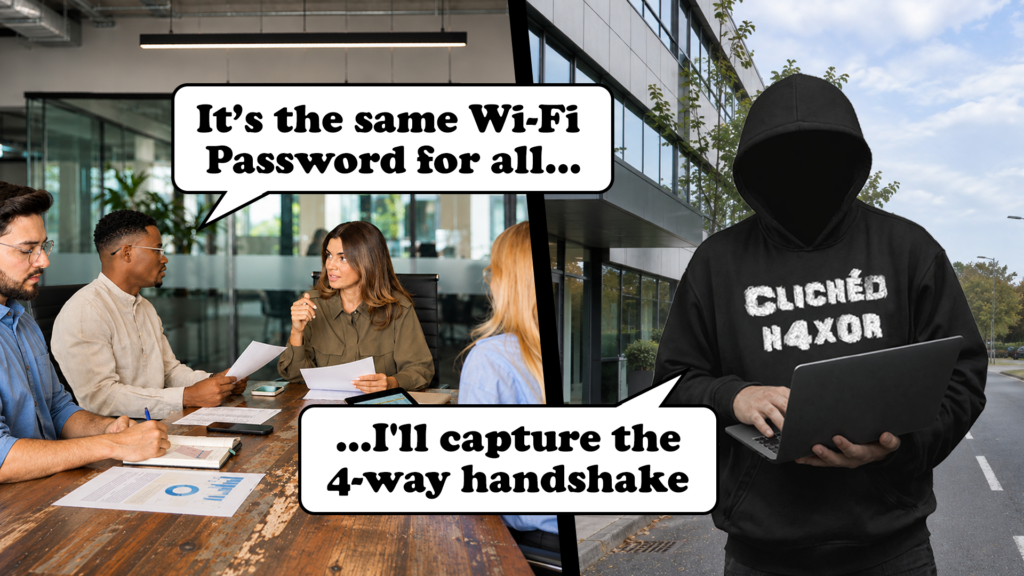
Walk into a small to medium-sized office and there’s a good chance everyone is using the same Wi-Fi password. Staff know it, contractors might know it and sometimes it’s even written on a sign in reception. Convenient, certainly. But there’s a problem with giving everyone the same password. Once it’s out there, you’ve got very little control over who still knows it.
WPA2-PSK (Pre-Shared Key) is still used in plenty of business environments. It’s essentially the same one password for everyone system many of us use at home. While WPA2-PSK provides strong encryption when configured with a suitably complex passphrase, the way shared passwords are managed can create some interesting opportunities for an attacker.
The attack involves capturing the four-way handshake that takes place when a device connects to a WPA2 network. With the right information, an attacker can take that packet capture away and attempt to crack the password offline. And they don’t necessarily need to get inside the building to do it.
The attack cycle from ping to pwned
One of the more concerning aspects of attacking WPA2-PSK is that the attacker doesn’t need to remain on site. They only need to be within wireless range of the network long enough to capture the necessary information. Depending on the building and access point coverage, that could be possible from a car park or a neighbouring office.
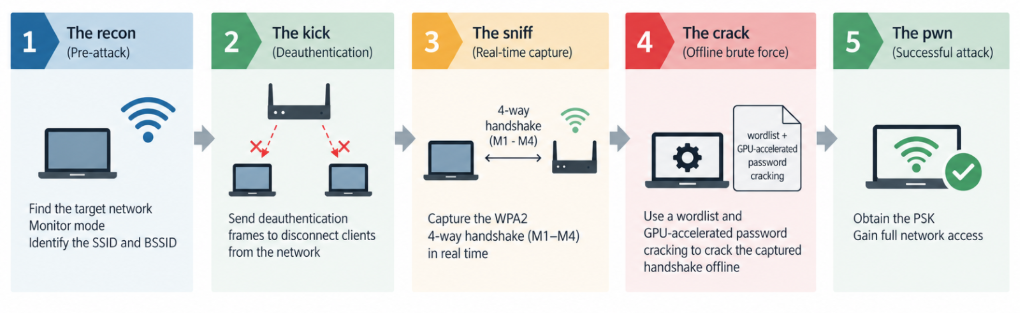
The deauthentication attack: the “kick”
An attacker can use a wireless card in monitor mode to observe Wi-Fi traffic, including the MAC addresses of connected devices. The attacker can then create and send a spoofed deauthentication frame to a connected device, pretending to be the office router. This frame effectively tells the device that its connection has been terminated. If accepted, the device disconnects from the network.
Capturing the four-way handshake: the “sniff”
As most devices will automatically reconnect to known Wi-Fi networks, this provides an opportunity to capture the authentication exchange. As the device reconnects, it performs a WPA2 four-way handshake. This is a series of four packets used to prove that both the router and the laptop know the password without actually sending the password over the air. The attacker “sniffs” these four packets. Once they have them, they have everything they need and can be on their way anywhere in the world to finish the job.
Offline password cracking
The captured handshake doesn’t contain the Wi-Fi password in plain text. However, it contains information that allows an attacker to check whether a guessed password is correct.
The handshake contains a “hashed” version of the Wi-Fi password. Using tools like Hashcat and powerful GPUs the attacker can test millions of passwords per second. A predictable password like “Company2024!”, is much more vulnerable to this than a long, randomly generated passphrase. How quickly it can be recovered depends on the password, the available hardware, and the attacker’s chosen wordlists or guessing rules.
The important bit is that the password guessing happens on the attacker’s own equipment, which means the IT team won’t see any suspicious activity on the network.
A few other problems with WPA2-PSK
Cracking the password is only part of the problem. Even if you’ve got a strong password, sharing it across an entire office creates a few other issues.
For starters, there’s the problem of employees leaving the company. They still know the Wi-Fi password, and unless you change it across every laptop, printer, and connected device, they can potentially still access the network. That’s quite a lot of work just to remove one person’s access.
There’s also the issue of accountability. If everyone uses the same password, it’s difficult to tell who connected to the network using that credential. Other network logs may help identify individual devices, but the shared password itself tells you very little.
Then there’s what happens if someone gets hold of the password. Once connected, they can start looking for other accessible devices, servers, printers, and file shares. How far they can get depends on how well the network is segmented. If internal systems are accessible from the Wi-Fi network, an attacker has somewhere to start.
Without proper network segmentation, an attacker could potentially move beyond the Wi-Fi network and access other internal systems. This is where Virtual Local Area Networks (VLANs) come in. By separating guest devices, IoT equipment, and corporate systems into different networks, with the right firewall rules in place, you can limit what each network can access.
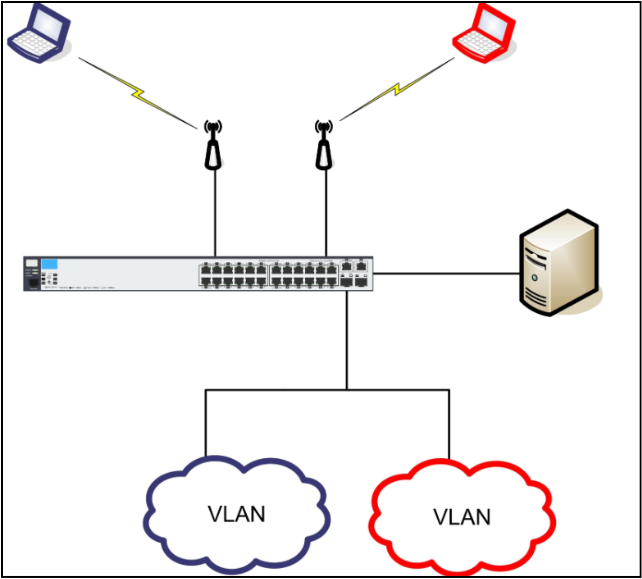
That way, even if someone compromises the guest Wi-Fi, they shouldn’t be able to reach sensitive systems such as finance servers or domain controllers.
Another element to consider is host isolation. On a guest network, devices do not need to see other devices like on a corporate network. If an enterprise device has connected to a guest network without host isolation, they could be targeted by connected attackers.
When the Wi-Fi password is in plain sight
Of course, there’s a much easier way to get hold of a Wi-Fi password. We still see Wi-Fi passwords displayed in offices, reception areas, and meeting rooms. At that point the difference between WPA2 and WPA3 becomes largely irrelevant. Anyone who can read or photograph the password has it and can access the network. From here, you are relying on network segmentation and isolation. A properly isolated guest network should give a threat actor very little to work with. But poor segmentation can give them opportunities that shouldn’t exist in the first place.
Dynamic Pre-Shared Keys (DPSKs) are another option where certificate-based authentication isn’t practical. Rather than providing every visitor with the same password, the network can issue separate credentials that expire or can be revoked without affecting everyone else’s access.
Of course, there’s not much point issuing individual credentials if they’re then displayed publicly for anyone to use. Access still needs to be approved and controlled.
WPA2/3-Enterprise: a better solution, but not bulletproof because of evil twin attacks
WPA3-Enterprise (802.1X) is the current “gold standard”. Instead of one shared password, every employee logs in with their own unique username and password (usually tied to their office account like Microsoft 365 or Google Workspace).
WPA2-Enterprise and WPA3-Enterprise (802.1X) are enterprise-grade wireless security solutions that replace shared passwords with per-user authentication, typically using credentials or certificates integrated with services such as Active Directory or Microsoft Entra ID. Authentication is performed through a RADIUS server using protocols such as PEAP or EAP-TLS, providing stronger access control and accountability than WPA2-PSK.
However, enterprise wireless networks remain susceptible to evil twin (rogue access point) attacks if client devices are not configured to properly validate the authentication server’s certificate.
In these scenarios, users may unknowingly attempt to authenticate to a malicious access point broadcasting the same SSID as the legitimate network. Depending on the authentication method in use, captured credential material may be subjected to offline password-cracking attacks. For this reason, proper certificate validation and secure client configuration are essential, while certificate-based authentication methods such as EAP-TLS offer the strongest protection.
Certificate-based authentication
A stronger approach is to move away from password entirely and use digital certificates (EAP-TLS). This renders deauthentication and handshake-sniffing useless, as there is no password to “crack” in the first place. This also prevents a spooged MAC address from granting access withouth the coresponding trusted certificate and private key.
Obfuscation: the SSID naming strategy
Another consideration is how much information the wireless network name gives away.
Attackers often scout for targets using high-gain antennas. Naming your Wi-Fi “Global_Corp_Secure” or “LawFirm_Internal” provides a roadmap for who to target, this is similar for well known company acronyms. Use random strings (e.g., “NS-772” instead of “Executive_Suite”). This prevents passerby from identifying the value of the data on the network.
Organisations may also choose to use a hidden SSID, requiring users to know both the network name and the password before connecting. However, hidden SSIDs are not a silver bullet; the network can still be identified using common wireless reconnaissance techniques, and hidden networks often introduce usability and management challenges for legitimate users.
How to protect the business
Step 1) Move to WPA2/WPA3 Enterprise
Move to WPA2 or WPA3 Enterprise (802.1X). Instead of everyone using the same Wi-Fi password, each employee or device has its own login details or digital certificate.
This step makes access much easier to manage. When someone leaves the company, you can remove their account or revoke their certificate without changing the Wi-Fi password on every device in the office.
Step 2) Configure certificate validation
Enterprise Wi-Fi must be configured correctly to protect against evil twin attacks. Devices should validate the RADIUS server’s certificate and connect only to the organisation’s trusted authentication server.
Where possible, use EAP-TLS, which authenticates devices using digital certificates rather than passwords. Certificates should be securely issued, renewed and revoked when devices are lost, replaced or no longer authorised.
Step 3) Protect devices against forced disconnections
Enable Protected Management Frames (802.11w) on your wireless network.
This helps prevent attackers from sending fake messages that force devices to disconnect from Wi-Fi. It’s particularly useful against the deauthentication attack explained earlier in this blog.
Step 3) Strengthen shared-password Wi-Fi
If you still need to use a shared Wi-Fi password, WPA3-Personal is a safer option than WPA2-Personal.
It uses a more secure method of connecting devices, making it much harder for attackers to capture a handshake and use it to crack the password offline.
You’ll need to check that your wireless equipment and devices support it.
Step 4) Keep guest devices separate
Visitors and personal devices shouldn’t have access to the same network as your company’s internal systems.
Set up a separate guest Wi-Fi network that can’t access corporate devices, servers, or sensitive information.
It’s also worth enabling client isolation. This stops devices on the guest network from communicating directly with each other, making it harder for someone connected to the Wi-Fi to attack another guest’s device.
Conclusion
Shared Wi-Fi passwords are difficult to justify on a corporate network. Everyone has the same credential, individual access is difficult to revoke, and a captured WPA2 handshake can potentially be attacked offline without generating any further traffic on the target network.
For corporate Wi-Fi, WPA2 or WPA3 Enterprise with certificate-based authentication gives much better control over who and what can connect. If someone leaves, their access can be removed without changing the password across every laptop, phone, printer, and other connected device.
Guest and IoT networks should be kept away from internal systems so that getting onto the wireless network does not automatically give someone access to everything behind it.
Non-descriptive SSIDs can avoid giving away unnecessary information, but they are not a security control on their own. The important bit is removing the shared credential where possible, properly authenticating devices and users, and limiting what they can reach once connected.
Because ultimately, the important thing isn’t just who can connect to your Wi-Fi. It’s what they can do once they’re on it.