

TL;DR
- Allow-list the test team’s source addresses, or provide a temporary, restricted route to the origin. Do not disable the WAF globally or leave a permanent bypass in place.
- A WAF blocking a test payload does not prove that the application rejected it safely. It only proves that the WAF blocked that version of the request.
- Test the application first through the controlled origin route. Then replay confirmed findings through the normal WAF path to measure what the control blocks, alters, or passes.
- Check the other door. Is the route through the WAF the only route available for the application?
“Do you need us to do anything with the WAF?”
It’s a common question during the kick-off call for a web app test. You’ve sorted the test accounts, shared the API documentation and agreed which hostnames are in scope. Then someone mentions the Web Application Firewall (WAF), and there’s a long pause.
The answer is yes. Please allow-list the test team’s source addresses or provide a temporary, restricted route to the origin.
This is not because a WAF is pointless. It serves an important purpose, but testing the application and testing the WAF are two different jobs. If the WAF blocks every request from the start, the assessment may only tell us that the WAF blocked our requests, not whether the application is secure.
This is not a new lesson for us. In WAF (Web Application Firewall) Testing for dummies, published in 2014, we described the WAF as an additional layer rather than a replacement for secure application coding and testing. Twelve years on, we are still making the same point because a WAF can block known requests without fixing the vulnerability underneath. The earlier article focuses on testing WAF rules and payload handling; this one focuses on how to scope the application test so that the WAF does not hide the application’s behaviour.
The first scan
A request containing a classic SQL injection payload gets blocked as shown in Figure 1. A second request gets a CAPTCHA. After a few more attempts, the source address is rate-limited.
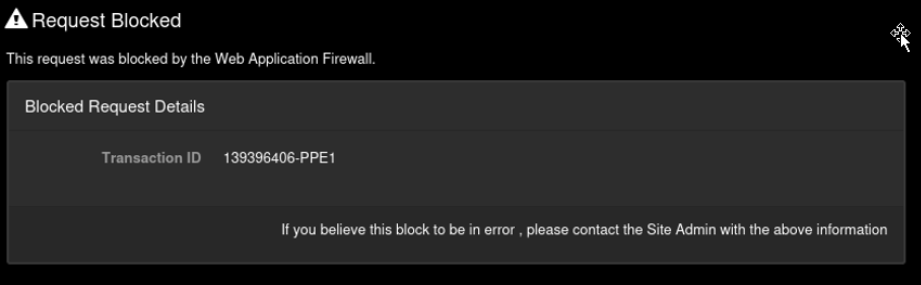
From the edge, this looks like the security control working exactly as intended.
From the application tester’s point of view, it creates a problem. We do not yet know whether the application rejected the input safely or whether the WAF recognised one version of the payload before the application saw it.
Those are very different outcomes.
If the application has safely parameterised the query, that is good news. If it is vulnerable but the WAF happened to catch the request, reporting the endpoint as safe gives the team false confidence. The underlying vulnerability is still there, waiting for a different request, a different route or a different set of rules.
The same applies to broken access control. A WAF can recognise suspicious characters in a request, but it is not normally deciding whether user A should be allowed to access user B’s invoice. That decision belongs in the application.
The application behind the gateway
A typical request path looks something like this:
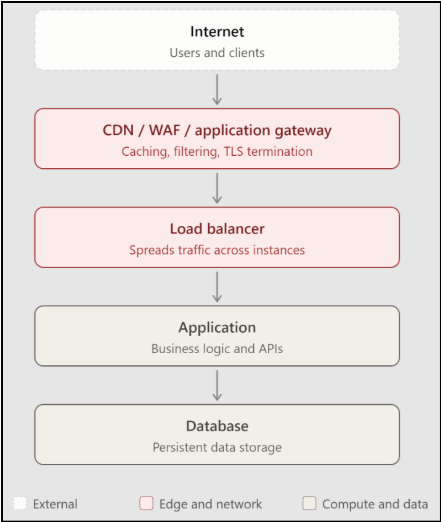
When we test through the WAF, we are testing the application as modified by everything in front of it. The gateway may terminate TLS, rewrite headers, normalise URLs, enforce size limits or parse multipart bodies before forwarding them.
That can be important. If the WAF sees one request and the application sees another, the result may say more about the disagreement between those components than about the application itself.
A request-smuggling or parser-differential issue does not require the WAF to be completely compromised. It only requires the WAF and the application to interpret the same bytes differently.
The other door
The next part of the test is to work out whether the WAF is actually the only route to the application.
It often is not.
We look for old DNS records and forgotten hostnames. We check whether a cloud load-balancer address is exposed separately. We review subdomains, certificates and historical information that may help map the environment. We consider whether a Server-Side Request Forgery (SSRF) issue could reach the origin from inside the network.
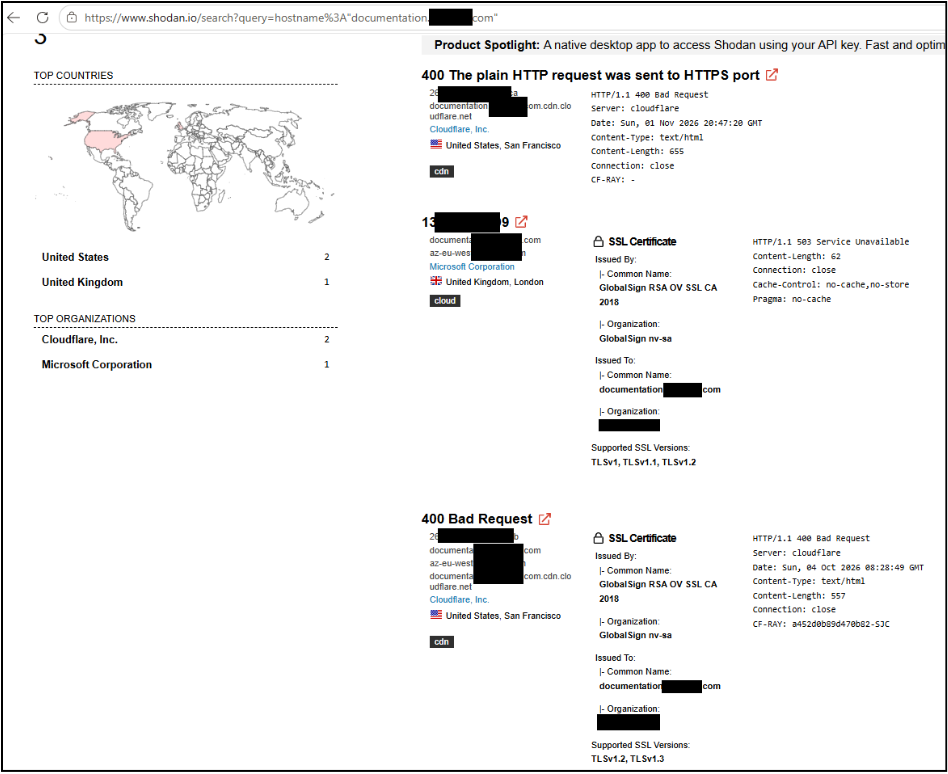
Certificate transparency logs do not automatically reveal an origin IP address, but they can reveal hostnames that help build a picture of the infrastructure. A shared host, an old backend name or a forgotten load-balancer address can be enough to change the security properties of the test.
The important question is not whether a WAF exists. It is whether every route to the application is forced through it.
If an attacker reaches the origin directly, they may be able to interact with the application without the WAF’s rate limits, request transformations or blocking rules. That is the same application we were trying to test in the first place.
The security appliance is software too
There is another reason not to treat the WAF as an unquestionable security boundary: the appliance or service enforcing the policy can itself be compromised.
In 2020, the CISA reported confirmed compromises of F5 BIG-IP devices affected by CVE-2020-5902, a critical remote-code-execution vulnerability. In 2022, CISA and the Multi-State Information Sharing and Analysis Center (MS-ISAC) reported active exploitation of CVE-2022-1388, an authentication bypass in the iControl REST API that allowed unauthenticated attackers to execute commands and take control of affected systems.
More recently, in 2026, security researchers disclosed CVE-2026-107825 affecting OWASP Coraza WAF, where URI parsing inconsistencies could allow specially crafted requests to bypass security rules and evade inspection. Around the same time, Barracuda Networks disclosed a combination of pre-authentication authorization bypass and command injection vulnerabilities affecting several of its security appliances, including its Web Application Firewall products, potentially enabling attackers to obtain root access when administrative interfaces were exposed.
These were not examples of a new SQL injection payload slipping past an intact WAF rule. They showed that a security appliance is still software, has an administrative plane and can become an attacker-controlled part of the perimeter.
A compromised edge device can change routing, alter policy, expose credentials or stop enforcing the controls the organisation believes are in place. An unpatched WAF with an internet-facing management interface is not a reliable security boundary.
The research backs this up
Recent research on parsing discrepancies, published in WAFFLED: Exploiting Parsing Discrepancies to Bypass Web Application Firewalls, tested Amazon Web Services (AWS) WAF, Microsoft Azure WAF, Google Cloud Armor, Cloudflare WAF and ModSecurity on NGINX. The researchers reported 1,207 bypasses involving differences in how WAFs and application frameworks interpreted multipart, JSON and XML requests.
The technique changed the structure of the request rather than simply hiding the attack payload. In the tested cases, the WAF missed content that the application still parsed.
This supports the two-pass approach: test the application directly, then replay confirmed findings through the WAF. It does not mean that every deployment of those products is vulnerable in the same way.
The scan gets slower
There is a less dramatic problem with leaving the WAF fully active: it consumes the testing time.
Burp active scanning, nuclei, sqlmap and content-discovery tools can generate thousands of requests. The edge sees that traffic, throttles it and eventually blocks the source address. We can slow the tools down, but a scan that should take twenty minutes now takes hours. It may run overnight, fail part-way through or have to start again.
The other option is to distribute the traffic across multiple source addresses. That adds infrastructure and cost, and spraying aggressive traffic across many hosts at a client’s edge is unnecessary risk during a co-operative engagement. It can also look uncomfortably like denial-of-service activity.
Neither option improves the application test. Time spent persuading a scanner to get past a rate limit is time not spent investigating authentication, business logic or access control. However, determined attackers are not restricted by time.
The two-pass test
The useful approach is to split the work into two passes.
Pass one: test the application
Use a temporary, controlled route that allows the assessor to reach the application without WAF interference. It should be restricted to the assessment source addresses, logged and removed when the test is complete.
This pass is where we test the application and its API as they actually behave. That includes authentication, authorisation, input validation, business logic, file handling, error handling and endpoints that are often missed by browser-only testing.
Allow-listing the test team’s source addresses is usually safer than disabling the WAF globally. An isolated test environment or private assessment route may be better still.
Pass two: test the WAF
Once a finding is confirmed against the application, replay it through the normal production-like path.
For each finding, we record whether the WAF:
- blocked the request;
- altered or normalised it; or
- passed it to the application.
That produces evidence about the control rather than a guess based on generic scanner output. It shows which vulnerabilities the WAF currently masks and which it does nothing for.
While we are there, we check the operational side too:
- Is the WAF in blocking mode or only logging?
- Does it cover API routes as thoroughly as browser-facing routes?
- Does it enforce consistent limits across HTTP versions and content types?
- Does it fail open under an approved resilience test?
- Do request transformations change security-relevant values?
- Are management interfaces isolated, patched and protected with strong authentication?
- Can the origin be reached through another hostname, address or internal route?
A reusable bypass header should not be the default solution. If one is necessary for an authorised test, it must be temporary, authenticated, source-restricted, logged and removed after the engagement.
What the report should say
A confirmed vulnerability needs fixing in the application whether or not the WAF blocks the test request. A block may depend on a particular rule, request representation or configuration, and may not hold if the origin is reached directly, the WAF is misconfigured, the product is unpatched or the request is parsed differently.
The report should distinguish between:
The application rejected the malicious input safely.
and:
The WAF blocked the test request before the application processed it.
Only the first tells us something positive about the application itself.
What to agree before the test
Before testing begins, make sure you’ve agreed the following:
- Which application and API hostnames are in scope.
- Whether a suitable test environment or restricted route to the origin is available.
- Whether the testing team’s source addresses will be allow-listed or whether the WAF will be bypassed or tested separately.
- How temporary access will be restricted, logged, and monitored.
- Who is responsible for making any configuration changes and restoring them afterwards.
- How temporary access will be removed and verified once testing is complete.
The aim is to give testers the access they need without introducing unnecessary risk. Don’t leave behind a permanent bypass, expose the origin without appropriate restrictions, or assume that a successful WAF block means the application is secure.
The point
A WAF that blocks a test payload proves only that it blocked that payload on that day. It does not prove that the application is secure or that the origin is unreachable.
Test the application through a controlled origin path, then replay the confirmed findings through the WAF. Keep the WAF as a layer of defence, not as a substitute for testing what the application does underneath.